You have forty‑three open deals. Glen has read all of them.
Glen is a chat-native AI account executive. It reads your CRM, researches your
accounts, and hands you the deals that need you today — with receipts for every claim.
Three things. Meridian has gone quiet for eleven days — their VP Eng left on 4 March.
Meridian Health$148,000 · STAGE 4At risk
Arbor Logistics$92,500 · STAGE 3On track
I’ve drafted a re-entry note to their new interim lead. Want to see it?
source: your crm · press · leadership page — every claim linked
WORKS WITHHubSpotSalesforceSlackTelegram
The Monday problem
The selling was never the hard part.
Monday starts with archaeology
Scrolling your own sent folder and CRM notes to reconstruct what you promised, and to whom, before you can sell anything.
The CRM is a museum
A record of what already happened, updated under duress. It tells you where deals were, never which one is quietly dying right now.
Deals die quietly
Nobody sends a calendar invite for “champion went dark.” The signal is in the pattern — and the pattern is spread across forty-three deals.
How it works
Three steps, and then it is simply part of your morning.
01 · CONNECT
Connect your CRM
HubSpot or Salesforce, read-only, in about two minutes. Glen sees what you see — pipeline, contacts, history.
02 · ASK
Ask anything
“What’s at risk?” “Prep me for the Meridian call.” “Find companies like my best customers.” In the app, Slack, or Telegram — one brain everywhere.
03 · APPROVE
Approve what changes
Glen drafts the outreach and stages the CRM update. Nothing is written and nothing is sent until you say so.
A real answer, not a demo script
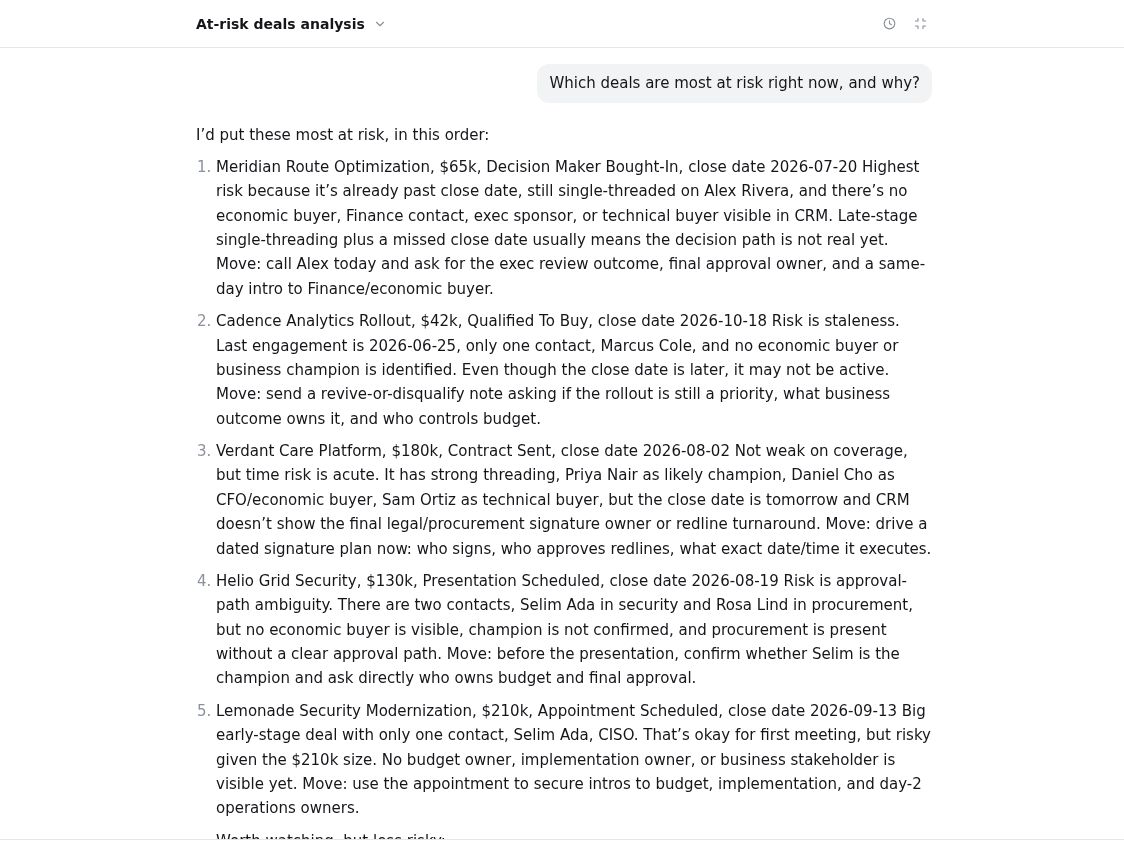
Ask which deals are at risk. Get an argument, not a dashboard.
Below: Glen’s unedited answer against a live CRM — ranked risks, the evidence for each, and the next move. Every deal it names becomes a link into your pipeline.
“Which deals are most at risk right now, and why?” — live answer
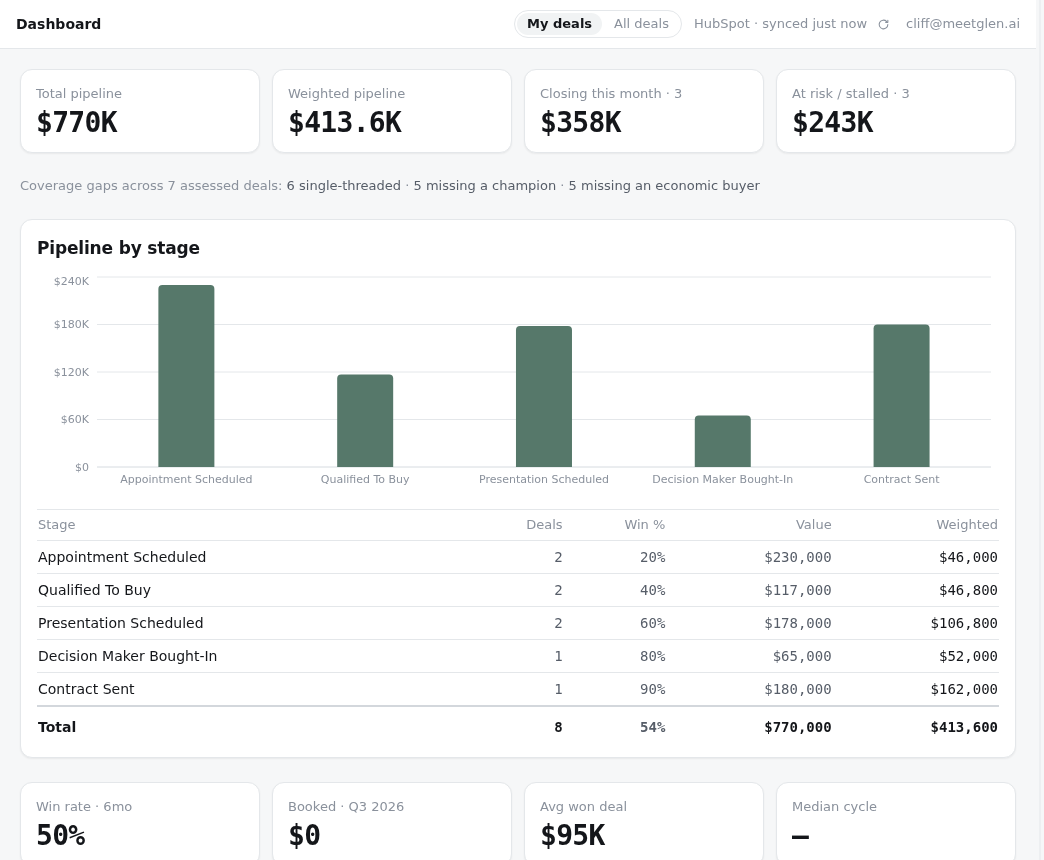
The dashboard: coverage gaps, win rates, and what’s quietly at risk
Why Glen exists
The job was never the selling — it was the reconstruction. Sunday nights spent
scrolling the sent folder, working out what was promised, and to whom. Glen is for that: something that has
already read all of it, and tells you the truth about what you missed.
Trust, structurally
Built so the safe thing is the only thing it can do.
Glen never sends email. Ever.
It writes the draft; you send it from your own client. There is no send button to guard because there is no send.
No inbox access
Glen reads your CRM and the public web — not your email, not your calendar. What you tell it in chat is what it knows.
Read-only by default
Every CRM write is staged behind an explicit approval you click. Decline it and nothing happened.
Your tenant, your keys
Workspace isolation on every query, credentials encrypted at rest (AES-256-GCM), sign-in through WorkOS.
Pricing
One plan. Priced per rep, because that is who it is for.
Every feature, every channel, every seat the same. Start free for two weeks — no card,
nothing to uninstall, your CRM stays exactly where it is.